800-214-0957 info@blackbottleit.com
Digital Spring Cleaning: A Must for PCI Compliance

Digital Spring Cleaning: A Must for PCI Compliance

If you process even a single credit card transaction, this message is for you. From the corner coffee shop to the bustling e-commerce store, PCI compliance isn’t optional – it’s essential. And with spring around the corner, there’s no better time to clean up your digital security.

Who Needs PCI Compliance?

The short answer? Everyone who accepts credit cards. This includes:

  • Small retail shops processing in-person transactions
  • Restaurants with payment terminals
  • Online stores of any size
  • Service providers accepting card payments
  • Mobile businesses using card readers
  • Subscription-based businesses with recurring payments

The Myth of Being “Too Small to Target” Many small business owners think their size protects them. Unfortunately, cybercriminals often target smaller businesses precisely because they tend to have weaker security measures. In 2023, 43% of cyberattacks targeted small businesses, and the average cost of a data breach for small businesses exceeded $200,000. (Verizon)

Spring Cleaning Your Security for PCI Compliance

Start with Password Hygiene

Your payment processing systems are only as secure as their passwords. Implement a password manager for all employees and require complex passwords with minimum 12-character lengths. For PCI compliance, ensure all default passwords on payment terminals and systems are changed immediately.

Clean Up User Access

PCI compliance requires strict access control. Review and revoke access for former employees, particularly those who handled payment data. Implement role-based access control (RBAC) to ensure employees only access what they need for their specific jobs.

Update and Patch Everything

Payment systems must have the latest security patches. Schedule automatic updates for all software, especially:

  • Point-of-sale systems
  • Payment terminals
  • E-commerce platforms
  • Card readers
  • Backend payment processing software

Backup and Recovery Check

PCI compliance requires secure backup of cardholder data and a tested disaster recovery plan. Store backups in multiple locations, but ensure they’re encrypted and protected according to PCI standards.

Train Your Team

Your employees are your first line of defense. Schedule regular training covering:

  • Proper handling of credit card information
  • Recognition of card skimming devices
  • Identification of phishing attempts
  • Secure remote work practices
  • Incident reporting procedures

The Benefits of Compliance

Beyond avoiding penalties, PCI compliance offers substantial benefits:

  • Protected payment card data reducing breach risk
  • Enhanced customer trust in your business
  • Reduced likelihood of fraudulent transactions
  • Improved overall security posture
  • Potential insurance premium reductions

Getting Started

Begin with a self-assessment to determine your current compliance level. The PCI Security Standards Council offers questionnaires based on your transaction volume and processing methods. Use this spring cleaning period to:

  1. Complete the appropriate self-assessment questionnaire
  2. Conduct a network scan if required
  3. Address any gaps in your security
  4. Document all your security procedures
  5. Train your staff on new procedures

Remember, cybersecurity isn’t a one-time spring cleaning task – it’s an ongoing process. However, using this season to establish strong security habits can set your business up for long-term success and compliance.

Maintaining a clean and secure digital environment isn’t just about checking boxes for PCI compliance – it’s about protecting your business, customers, and reputation. No company is too small to start taking security seriously. Begin your digital spring cleaning today, and make security a year-round priority.

Black Bottle IT wants to connect with your business today.  Our cybersecurity consultants will get started with the appropriate assessment questionnaire. Email us at info@BlackBottleIT.com. 

Beyond Break-Fix: Transform Your IT with Proactive Management

Beyond Break-Fix: Transform Your IT with Proactive Management

Implementing a comprehensive, proactive maintenance strategy through Managed IT Services is essential for modern businesses seeking to maintain operational excellence and minimize costly downtime.

Organizations can identify and address potential issues before they escalate into major problems that disrupt business operations by continuously monitoring system health, automating critical updates, and conducting regular infrastructure assessments. This preventive approach safeguards against unexpected system failures and optimizes performance across the entire IT infrastructure. A well-managed IT environment reduces security risks, ensures compliance with industry standards, and provides predictable IT costs through strategic planning.

Moreover, with automated monitoring and expert oversight, businesses can focus on their core objectives while maintaining confidence that their technology infrastructure is operating at peak efficiency, backed by robust disaster recovery protocols that protect against both natural disasters and cyber threats. This proactive stance ultimately translates into improved system reliability, enhanced user productivity, and a more substantial return on technology investments.

5 Proactive IT maintenance and managed services Black Bottle IT focuses on with their clients:

  • Regular system monitoring and diagnostics detect potential hardware failures, performance bottlenecks, and security vulnerabilities before they cause disruptions – this includes monitoring server health, network traffic patterns, and system resource usage to identify warning signs early.
  • Automated patch management and software updates ensure all systems have the latest security fixes and performance improvements, reducing exposure to cyber threats and preventing compatibility issues between applications.
  • Scheduled hardware assessments and lifecycle management help plan for equipment replacement before components reach end-of-life, preventing unexpected failures and allowing for strategic budget planning for upgrades.
  • Continuous network optimization through bandwidth monitoring, traffic analysis, and infrastructure tuning keeps data flowing efficiently and prevents slowdowns that can impact productivity.
  • Systematic data backup verification and disaster recovery testing ensures business continuity plans remain viable and can be executed successfully if needed, protecting against both system failures and cybersecurity incidents.

Black Bottle IT would love to learn more about your work environment and provide an assessment for a modern-day Managed IT and Cybersecurity Solution. Contact us today!

Going Beyond Boundaries. The Need to Define Access Controls   

Going Beyond Boundaries. The Need to Define Access Controls   

It is about that time of year when employees submit for their vacation. Will you allow them to take their work computer on vacation? There are two obvious reasons not to allow their workbag to travel with them. Vacations are a time for rest, relaxation, and spending time with friends and families. Second, a work computer undoubtedly contains sensitive information. A leak of any sensitive information in or out could be catastrophic to your organization.   

What are Access Controls?  

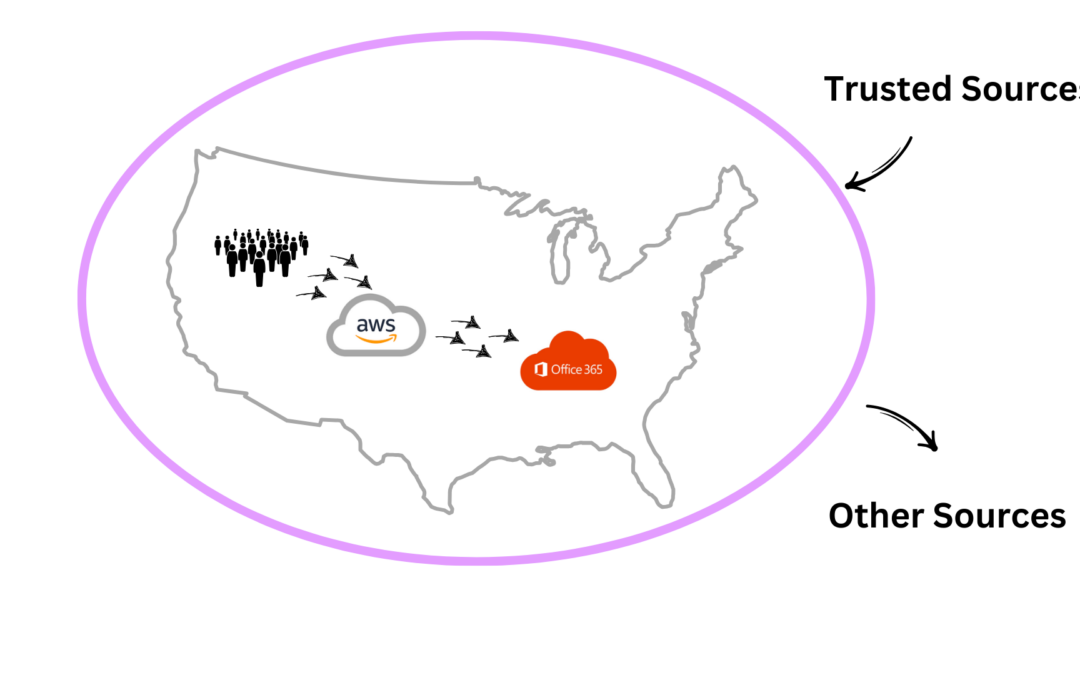
Access controls are security measures or ‘boundaries’ that regulate who can access specific resources, such as data, systems, or physical locations, what actions they can perform when they have access, and where they can access.  “Good access control rules around your tenant” specifically means that your organization must limit “who can access the account, from where, and from what device.”  

As in the illustration, access controls can limit where systems can be accessed by specific machines and even by allowed business hours. So, if a bad actor is trying to access critical systems from outside the normal geography of business (e.g., outside the U.S.), during odd times of the day (e.g., 2:00 a.m.), access would be blocked. This type of control protects sensitive data if credentials are compromised.  

 
It is important to define where company employees access systems, from what machines, and during what times of the day. If employees are doing work outside of these controls, develop a process for requesting temporary access, for example, working from the beach, and set the beginning and ending timeframes to remove access from these temporary situations.


Why Access Controls?  

Reducing the attack surface: Limiting access to systems and data reduces the potential attack surface for cybercriminals. Even if a malicious actor gains access to login credentials,  part of access controls can prevent them from compromising systems.

There is a lot at stake in addition to protecting sensitive data. Access controls ensure that only authorized users have access to sensitive information. While the experts at Black Bottle IT are focused on cybersecurity and limiting the potential for a cyber incident, when you limit geography, machine, and time systems can be accessed, you also reduce the risk of human errors that cause lost data.   


Three Reasons Why Access Controls Are Fundamental 

Compliance requirements: Many industries have strict regulations governing the protection of sensitive data, such as HIPAA in healthcare or GDPR in the European Union. Implementing access controls helps organizations comply with these regulations by demonstrating that they have measures to safeguard data.

Detecting and responding to security incidents: Access controls can also help detect and respond to security incidents. Organizations can identify suspicious activity and respond promptly to potential threats by logging access attempts and monitoring user behavior.  

Maintaining business continuity: Cybersecurity incidents can disrupt business operations and lead to significant financial losses. Access controls help maintain business continuity by minimizing the impact of security breaches and ensuring that critical systems and data remain protected. 


What Your Organization Must Do to Protect Company Data  

  • Heighten Cybersecurity Awareness & Phishing Training    
  • Enforce Access Controls around all cloud-based tools, i.e., AWS, Google Workspace, QuickBooks Online, Microsoft Office 365   
  • Lock down the Administrative Account to a specific IP address  
  • Monitor Tenants 24×7 — multiple organizations or individuals, referred to as “tenants,” share the same computing infrastructure, resources, and services  
  • Continuous monitoring is crucial for promptly detecting and responding to security threats and incidents as they occur, minimizing the potential impact on tenants’ data and systems.  


Remember: Heightening cybersecurity controls, like access controls, does not indefinitely prevent a cybercriminal from gaining access but makes it more difficult.   

Everyone deserves a vacation. We have you covered.  Contact us today for more information and how to get started with access controls. blackbottleit.com/contact-us.

The More Cybersecurity Changes The More it Remains the Same

The More Cybersecurity Changes The More it Remains the Same

“The more things change, the more they stay the same” means that despite apparent changes or advancements, certain fundamental aspects or patterns remain unchanged over time. One could relate this to cybersecurity.

  • Cyberattacks cost impacted organizations thousands, if not millions, of dollars.
  • Cybersecurity is a critical element of homeland security after 9-11.
  • Ransomware and phishing have always been pervasive.
  • Since on-premise storage still exists for some businesses, despite the rise of cloud computing, monitoring and protecting data will remain an important part of any security execution plan.

Gartner reports that 85% of organizations will embrace a cloud-first principle by 2025 and will not be able to fully execute their digital strategies without the use of cloud-native architectures and technologies. (May 2023)

Three Key Cybersecurity Focal Points that Will Remain the Same for Foreseeable Future

Rise in Cybersecurity Regulations:

Governments and regulatory bodies were expected to enhance and introduce new cybersecurity regulations to address the evolving threat landscape and protect sensitive data.

Focus on Cloud Security:

With the increasing adoption of cloud services, there was a growing emphasis on securing cloud environments. This includes implementing robust identity and access management, encryption, and monitoring.

Enhanced Endpoint Security:

As remote work became more prevalent, securing endpoints (devices used by employees) gained importance. Endpoint detection and response (EDR) solutions were expected to evolve.


This year, we will learn more about AI and machine learning techniques to improve response efficiency.

Black Bottle IT is focused on keeping data secure, which, in turn, will keep your business operational and competitive.  Please reach out if you want to outsource your organization’s cybersecurity function!  Contact us today. 

What Managed IT Solution is Best for Your Business?

What Managed IT Solution is Best for Your Business?

What Managed IT Solution is Best for Your Business?


When engaging Companies, our team here at Black Bottle IT receives many questions about what tools and services are right for their business. But, there is one question Black Bottle IT frequently gets, “what solutions would you recommend to us?” The answer isn’t simple. There is no “silver bullet” that cures all cybersecurity risks.


To simplify, when looking for a cybersecurity solution, typically companies fall into three categories:


1. Companies that recognize the need to upgrade security solutions and HAVE in-house technical talent:


In this scenario, Black Bottle IT will advise the Company on the right security solutions to fit its situation. Once the solutions are selected, Black Bottle IT will help implement and craft the correct policies and procedures to govern the new processes. This activity is typically done side by side with the in-house talent to hand off 100% of the operations back to the Company’s technical team. Post implementation, we strategically advise, when necessary, as the ever-changing security threat landscape changes with new solutions to keep pace.


2. Companies that recognize the need to upgrade security solutions and DO NOT HAVE in-house technical talent:


These businesses are our favorite Companies to consult with at Black Bottle IT. Business leadership is savvy enough to understand the risk a cyber attack poses and knows the Company doesn’t have enough in-house talent to find, implement and manage the necessary solutions. Cybersecurity talent is hard to find, and most SMB businesses do not have the budget for a dedicated security team. In these instances, Black Bottle IT will recommend, implement and manage a security solution that meets the Company’s needs and reduces their risk of a cyber attack. Going forward, Black Bottle IT will act as advisors and part of the technology team.

 
3. Companies that may not understand their cyber risk and need some education:


Part of our mission is to inform Companies of the risk a cyber attack can have on their business. In these conversations, we provide industry information, statistics, case studies relevant to the Companies industry. Our goal is to make sure leadership knows the risk. Ultimately, we want to help them and gain them as a client, but the reality is, most Companies that fall into this category need time to digest the information and then quickly realize they need to address the risk. Implementation of solutions will start with low-hanging fruit, as the Company plans and budgets for future improvements.


How can we help your business?  There is always a go-forward plan that is right for you, your business, and your stakeholders. 

Contact Black Bottle IT today to learn more.